How to Do YouTube Keyword Research for Free in 2026
Most guides tell you to brainstorm keywords and then "validate them in a paid tool." Here is a different approach that costs nothing: instead of guessing, look at the videos already winning your topic and copy the keywords they have in common. Here is the exact method, with a real example.
The Short Version
Find the top 3 to 5 videos already ranking for your target search. Pull their tags. The keywords they all share are proven winners for that niche, you just reverse-engineered them for free. No vidIQ, no TubeBuddy, no guesswork.
If you search "youtube keyword research" you will find a hundred guides that all say the same three things: use YouTube autocomplete, check Google Trends, then "validate your keywords in vidIQ or TubeBuddy." Notice how the free advice always ends by pointing you at a paid tool. There is a faster, genuinely free way that most of those guides skip, probably because it does not sell a subscription.
The idea is simple. Videos that already rank for your target search have, in a sense, already done the keyword research for you. YouTube is showing them at the top because they match what people search. So instead of guessing which keywords to target, you look at what the winners are actually tagged with, and you take the keywords they have in common. Those shared keywords are about as close to "proven" as you can get without paying for data.
The Method, Step by Step
Search your target topic on YouTube
Type the exact thing your audience would search, for example "beginner home workout." Look at the top results, the videos YouTube ranks highest are the ones it considers the best match. Those are your reference videos.
Pull the tags from the top 3 to 5 videos
Tags are hidden from viewers, but they are in the page data. Paste each video URL into a free metadata extractor and you will get the full tag list in seconds. Do this for the top few videos, not just one, because the pattern is what matters.
Find the tags they share
Lay the tag lists side by side and look for overlap. Any keyword that shows up across multiple top videos is one the niche agrees on. A keyword only one video uses might be a one-off, but a keyword three winners all chose is a signal.
Use the shared keywords as your foundation
Put the strongest shared keyword in your title, work a few more into your description naturally, and add the rest as tags. You are now targeting the same proven terms as the videos already winning, for free.
A Real Example: Beginner Workout Videos
Theory is easy, so here is the method run on three real videos. I searched for beginner home workouts and took three of the top performers, all from big fitness channels, then pasted each URL into the extractor. Here is exactly what each one was tagged with, raw, the same view you get from the tool (click any screenshot to view it full size):
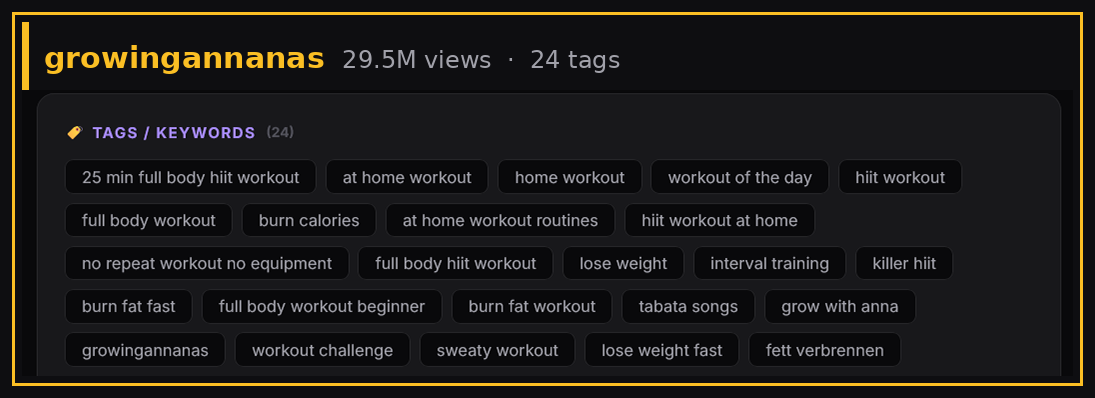
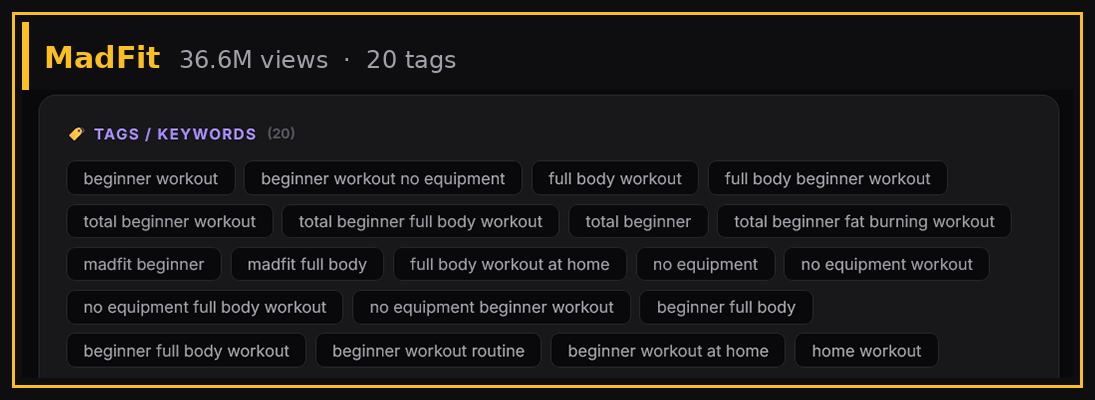
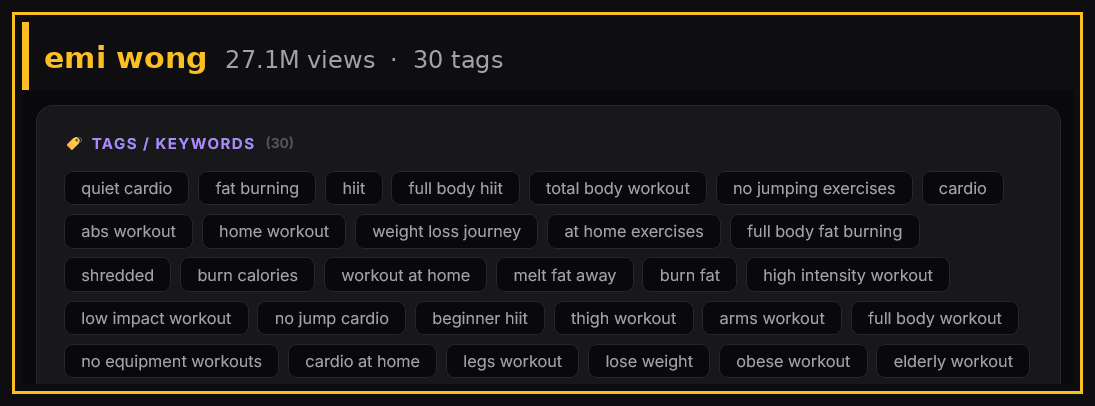
Read across all three and the repeats start jumping out. Stack the shared tags in one place and the pattern is obvious:
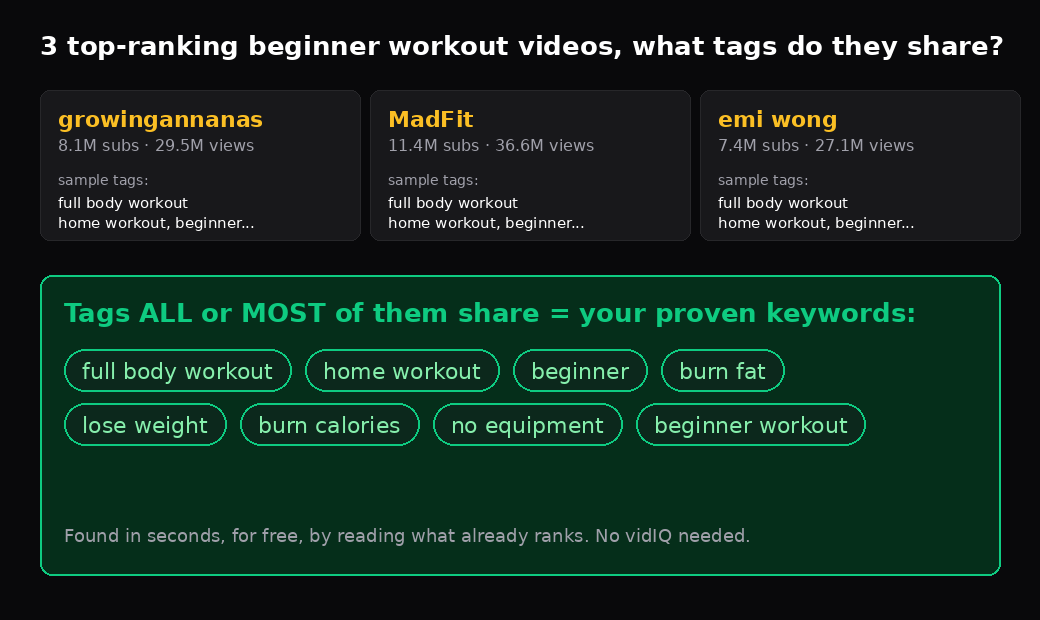
Three different creators, three different styles, yet the tags overlap hard. All three used "full body workout" and "home workout." All three leaned on "beginner" variations. Two of the three reached for "burn fat," "lose weight," and "burn calories." Nobody coordinated that. They each landed on the same core terms on their own, because those are the terms this niche actually runs on.
That overlap is your keyword list. If three videos pulling tens of millions of views all independently chose "full body workout," "home workout," and "beginner," those are clearly the terms that win in this niche. You did not need a paid tool or a search-volume estimate. You just read what already works.
Be Honest About What Keywords Can and Cannot Do
This is the part most keyword guides leave out, so here is the straight version. Keywords help YouTube understand and categorize your video, which gets it in front of the right people. That is real and worth doing. But keywords do not make people click, and they do not keep people watching.
In 2026 the algorithm leans heavily on satisfaction signals: click-through rate, watch time, and whether people finish or rewatch. A video built on perfect keywords with a weak title and thumbnail still loses. As we covered in our post on how many tags to actually use, the metadata is a supporting signal, not the engine. So do the free keyword research, it takes minutes, then put your real energy into a title and thumbnail people want to click.
Pull tags from any video in seconds
CreatorGrab grabs the full tag list, hashtags, description and HD thumbnail from any public YouTube video. No login, no extension, free. Perfect for the reverse-engineering method above.
Try the Free Extractor →Frequently Asked Questions
Can you really do YouTube keyword research without paying for tools?
Yes. The top-ranking videos for your topic have already been validated by YouTube's ranking system. By reading the tags they share, you get proven keywords for free. Paid tools add search-volume estimates and difficulty scores, which are useful, but they are not required to find the right terms to target.
How many videos should I check?
Three to five of the top results for your target search is plenty. You are looking for overlap, so you need enough videos to spot a pattern. One video is an anecdote, three or more agreeing is a signal.
How do I see a YouTube video's tags?
Tags are not visible to viewers, but they sit in the page source. The fastest way is a free metadata extractor: paste the video URL and it returns the full tag list instantly. No browser extension or signup needed.
Should I just copy all the tags from a top video?
No. Copy the keywords that several top videos share, since those are the proven niche terms, but only apply ones that genuinely describe your own video. Copying tags wholesale, including ones that do not match your content, adds noise and does not help.
Does YouTube show real search volume?
No. YouTube does not publish search volume data. Even YouTube Studio only shows impressions and traffic sources, not raw search numbers. That is exactly why the reverse-engineering method is useful: it sidesteps the need for volume data by reading what already ranks.
Where should I put my keywords once I find them?
Lead with your strongest keyword in the title, work a few naturally into the first lines of the description, and add the rest as tags. Do not stuff. One well-placed keyword in the title is worth more than twenty crammed into the tag box.
Bottom Line
Free YouTube keyword research is not about finding a secret tool. It is about realizing the answers are already public: the videos winning your topic are tagged with the keywords that work, and you can read them in seconds. Pull the top three to five, find the overlap, and you have your foundation.
Then spend the time you saved where it counts. Keywords get you in the room. Your title, thumbnail, and content decide whether you stay.