Use 5 to 15 relevant tags. Put your main keyword first. Stop there. Spending more than two minutes on tags is time better spent on your title and thumbnail, which influence views many times more than tags do.
That is the answer most people came here for, so it goes right at the top. But if you stop reading there, you will keep believing the thing that wastes the most creator time on the planet: that piling on more tags gets you more views. It doesn't. Let's look at why, because once you understand it, you will spend your tag time correctly and move on.
01The Myth: More Tags = More Views
Walk into any creator forum and you will find people agonizing over whether to use 10 tags or 30, hunting for the "perfect" number, copying giant tag lists from bigger channels. The belief underneath all of it is that the tag box is a lever, and pulling it harder gets more reach.
It isn't. YouTube has been unusually direct about this. If you open the tags section in YouTube Studio right now, you will see a small notice from YouTube itself stating that tags play a minimal role in helping viewers find your video. That is the platform telling you, on the upload screen, not to over-invest here.
Independent analysis lines up with that. Across recent YouTube SEO breakdowns, tags are consistently described as one of the lowest-weighted signals in the algorithm, far behind your title, your description, the spoken words in your video, your click-through rate, and how long people actually watch. Tags are a supporting signal, not a driver.
02The Proof: Two Real Videos
Theory is fine, but let's look at actual videos. We ran two very different ones through our own extractor and compared what came back. The contrast tells the whole story.
First, a small channel. "Games Benchmarks & Beyond" has about 4,000 subscribers, which is tiny. They posted a GTA-style loading screen video and loaded it up with tags and hashtags:
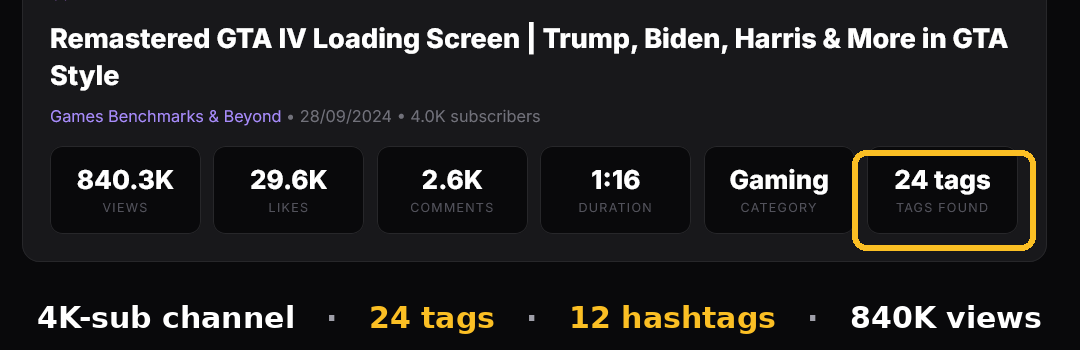
Twenty-four tags, twelve hashtags, and the video pulled 840,000 views off a 4K-subscriber channel. Here is the full tag list it used:
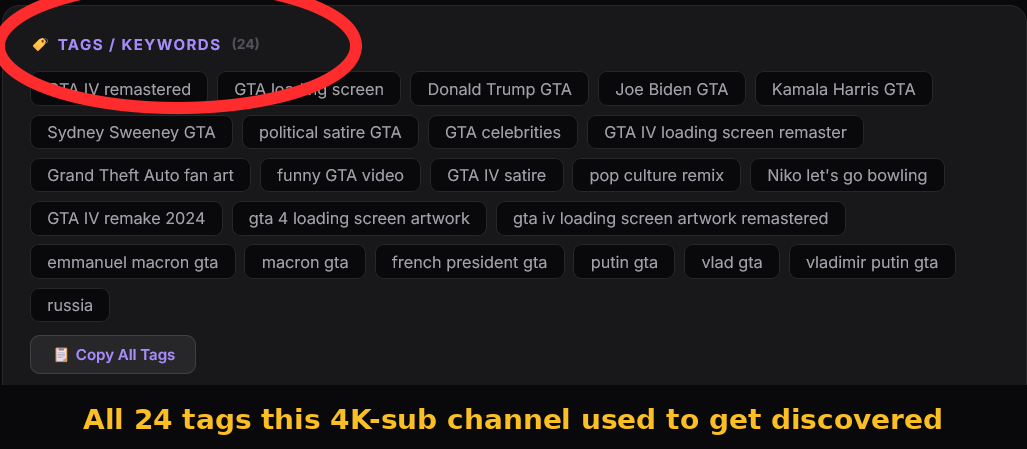
Notice these are not random keywords. Every one is a specific phrase someone might actually search, like "GTA IV remastered" or "Donald Trump GTA." So tags work, right? Hold that thought, because here is the second video.
This one is from "Mapal," an established channel with 138,000 subscribers. It is an After Effects tutorial, the kind of video you would expect to be carefully optimized. Watch what the extractor found:
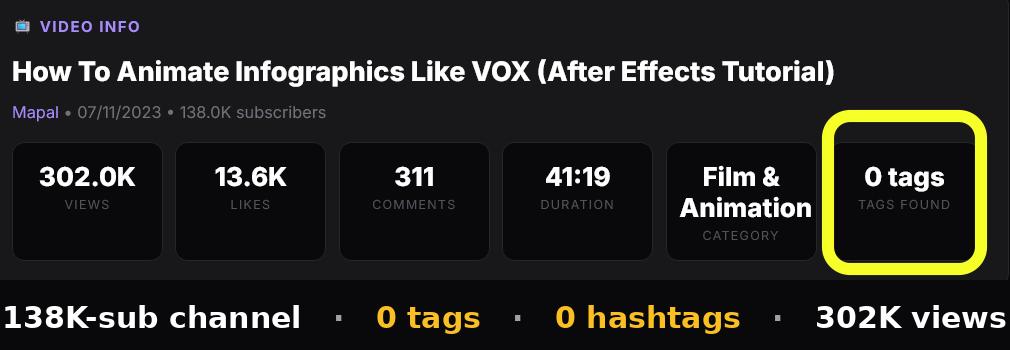
Zero tags. Zero hashtags. The readout literally says "0 tags found," with nothing in the tags or hashtags sections. And it still earned 302,000 views. An established creator put no effort into tags whatsoever and did just fine.
So one video had 24 tags and one had none, and both performed well. If tag count were the lever people think it is, that could not happen. The number clearly is not what is driving these results.
03So Why Use Tags At All?
Here is the part that reconciles it, and it is the genuinely useful insight. Tags help most when YouTube does not yet understand your video or your channel. Look again at the two examples through that lens.
The small 4K channel is a stranger to the algorithm. YouTube has little history to know what their content is or who to show it to, so extra tags give it context to work with. For a brand new or tiny channel, that nudge has real value. The established 138K channel is the opposite. YouTube already has years of data on exactly who watches their tutorials, so it needs no help categorizing them. Tags would add nothing, so they skipped them.
That is the whole rule in one sentence: the smaller and newer you are, the more tags help you, and the bigger you get, the less they matter. Beyond that, tags still do a couple of small jobs for everyone. They catch common misspellings of your keywords, and they help YouTube associate your video with the right topic cluster when the subject is ambiguous. Useful at the margins, never a growth lever.
the danger isn't using too few tags, it's spending an hour on tags while your title and thumbnail stay weak. Those two decide whether anyone clicks in the first place. Tags can't save a video nobody clicks.
04How to Actually Tag a Video (in 90 Seconds)
Since the count barely matters, the goal is to do it well and fast, then get back to the things that move views:
- Lead with your exact keyword. The first tag should be the precise phrase you want the video found for, for example "after effects tutorial".
- Add 3 to 5 close variants. Different ways people phrase the same search, plus one or two common misspellings.
- Add 2 to 4 broad topic tags. The wider category your video sits in, like "motion graphics" or "video editing".
- Stop at 15. One specific, relevant tag beats five generic ones. There is no prize for filling the box.
- Skip the copied mega-lists. Pasting a 40-tag list from a bigger channel adds noise, not reach, and tells YouTube nothing useful about your video.
If you want to see what tags a successful video in your niche actually uses as a starting point, you can check any public video in seconds with a free tag viewer. Use it for ideas, not for copying wholesale.
05What About Hashtags?
Hashtags are a different thing from tags, and people mix them up constantly. Tags are hidden metadata in the upload box. Hashtags are public, they go in your title or description, and the first three show as clickable links above your video title. They connect your video to a feed of others using the same hashtag.
The same "less is more" rule applies. Two or three well-chosen hashtags is plenty: one broad for your niche, one specific to the video, maybe one branded. YouTube only counts the first three anyway, and stuffing more than fifteen causes YouTube to ignore all of them. Notice the small channel in our example used twelve hashtags and the big one used zero, and again, both did fine.
Want to check the tags on any video?
CreatorGrab pulls the full tag list, hashtags, description and HD thumbnail from any public YouTube video, free and with no signup. Great for niche research and seeing what actually gets used.
06Frequently Asked Questions
How many tags should I use on a YouTube video?
Five to fifteen relevant tags, with your main keyword as the first one. Quality matters more than quantity, and there is no benefit to filling all 500 available characters. Stop once you have covered your keyword, a few variants, and the broad topic.
Does the number of tags affect views?
Not in any meaningful way. As shown above, videos with zero tags and videos with two dozen tags both perform well. Views are driven by your title, thumbnail, click-through rate, and watch time. Tag count is a minor supporting signal, not a growth lever.
Do YouTube tags still matter in 2026?
They matter a little, mostly for new or small channels and for catching keyword misspellings. YouTube's own upload screen states tags play a minimal role in discovery. Use them, but spend minimal time on them.
What is the recommended number of tags for YouTube videos in 2026?
The widely recommended range is 5 to 15. Anything beyond that hits diminishing returns fast. Front-load your most important keyword since the first tag carries the most weight.
Should I copy tags from successful videos in my niche?
Use them for inspiration, not wholesale copying. Seeing a competitor's tags can surface keyword ideas worth putting in your title and description, which matter far more. But only apply tags that genuinely describe your own video.
Are tags and hashtags the same thing?
No. Tags are hidden metadata added in the upload box. Hashtags are public, placed in your title or description, and clickable. Use 5 to 15 tags and 2 to 3 hashtags. They serve different, both minor, roles.
07Bottom Line
Use 5 to 15 relevant tags, lead with your keyword, and move on. The number is not a dial you can crank for more views, and our two real examples prove it: one video thrived with 24 tags, another thrived with none. What separated them was not tag count, it was that one channel was new and needed the context while the other was established and didn't.
Spend the time you save where it actually counts: a title people want to click and a thumbnail that stops the scroll. That is the real lever. Tags are just the quick housekeeping you do on the way there.